> ## Documentation Index
> Fetch the complete documentation index at: https://ekacare-mintlify-efa94f7d.mintlify.site/llms.txt
> Use this file to discover all available pages before exploring further.
# Authentication
> Securely connect your AI assistant to Eka.care
## Overview
Eka.care MCP supports two authentication methods to fit different integration needs:
**Best for:** Healthcare providers and clinics
Auto-authenticate with your Eka.care account. No manual credential management needed.
**Best for:** Third-party integrations
Use API credentials (Client ID, Secret, API Key) for programmatic access.
***
## Method 1: OIDC Flow (Auto-Authentication)
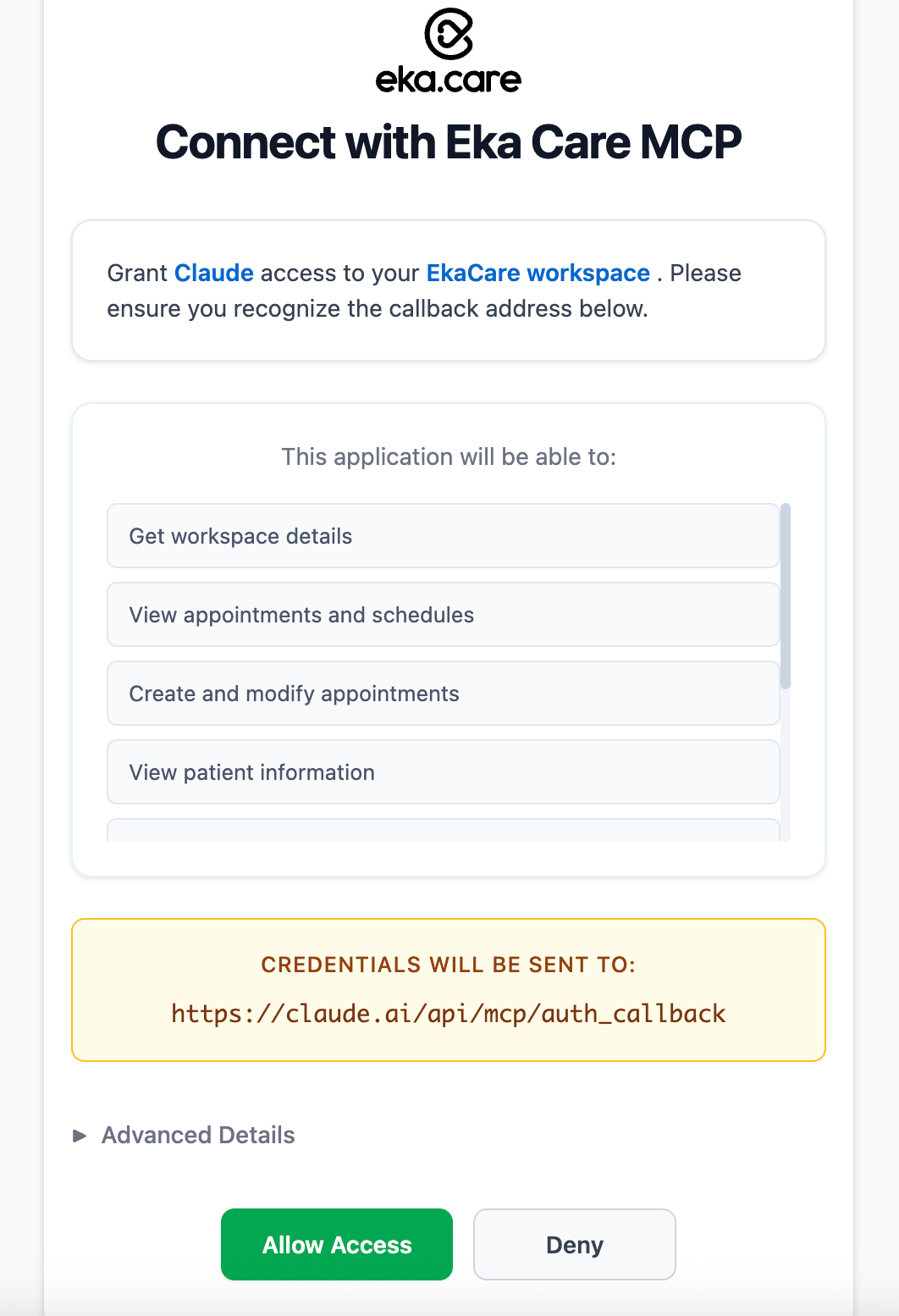
This is the **easiest and most secure** method. Your AI assistant authenticates using your Eka.care login, just like logging into the dashboard.
### How It Works
Claude Desktop or any MCP-compatible client
Opens a secure browser window
Use your existing Eka.care credentials
Your AI assistant now has secure access
 ## Method 2: Client Credentials
Use this method if you have API credentials (Client ID, Client Secret, API Key) from the Eka.care team.
### How It Works
Your MCP server authenticates directly with Eka.care APIs using:
* **Client ID**: Your application identifier
* **Client Secret**: Secret key for authentication
* **API Key**: to connect to a specefic workspace from your client\_id / client\_secret
### Setup Client Credentials
**1. Get your credentials:**
Get your client id and client secret from Eka developer [console](https://console.eka.care/api-keys/)
* Client ID
* Client Secret
If you are a standalone devleoper and wish to access workspaces of Eka Users you can either implement OIDC ( Oauth ) flow or get API Key from users workspace [Hub](https://hub.eka.care/account/account/apitoken/)
* API Key
For any issues you can contact **[ekaconnect@eka.care](mailto:ekaconnect@eka.care)** and request:
**2. Configure your `.env` file:**
```bash .env theme={null}
# API Configuration
EKA_API_BASE_URL=https://api.eka.care
# Client Credentials
EKA_CLIENT_ID=your_client_id_here
EKA_CLIENT_SECRET=your_client_secret_here
EKA_API_KEY=your_api_key_here
# Server Settings (optional)
EKA_MCP_SERVER_HOST=localhost
EKA_MCP_SERVER_PORT=8000
EKA_LOG_LEVEL=INFO
```
**Security Best Practices:**
* Never commit credentials to version control
* Use `.gitignore` to exclude `.env` file
* Rotate credentials periodically
* Use different credentials for development and production
**3. Update Claude Desktop config:**
```json claude_desktop_config.json theme={null}
{
"mcpServers": {
"eka-care": {
"command": "/full/path/to/.venv/bin/python",
"args": ["-m", "eka_mcp_sdk.server"],
"env": {
"EKA_CLIENT_ID": "your_client_id_here",
"EKA_CLIENT_SECRET": "your_client_secret_here",
"EKA_API_KEY": "your_api_key_here",
"EKA_API_BASE_URL": "https://api.eka.care"
}
}
}
}
```
**4. Test your connection:**
```bash theme={null}
# Start the MCP server
eka-mcp-server
```
You should see:
```
INFO: Authentication successful
INFO: MCP Server running on http://localhost:8000
```
### Credential Management Tips
**Quick test with curl:**
```bash theme={null}
curl -X POST https://api.eka.care/api/v1/auth/token \
-H "Content-Type: application/json" \
-H "X-API-KEY: your_api_key" \
-d '{
"client_id": "your_client_id",
"client_secret": "your_client_secret",
"grant_type": "client_credentials"
}'
```
Should return an access token if credentials are valid.
**Automatic refresh:** The MCP server automatically refreshes tokens before they expire.
**Default expiration:** Tokens typically last 1 hour and are refreshed automatically.
**No action needed:** You don't need to manually manage token lifecycle.
**Development:**
```bash .env.development theme={null}
EKA_CLIENT_ID=dev_client_id
EKA_CLIENT_SECRET=dev_client_secret
EKA_API_KEY=dev_api_key
EKA_API_BASE_URL=https://api-dev.eka.care
```
**Production:**
```bash .env.production theme={null}
EKA_CLIENT_ID=prod_client_id
EKA_CLIENT_SECRET=prod_client_secret
EKA_API_KEY=prod_api_key
EKA_API_BASE_URL=https://api.eka.care
```
**When to rotate:**
* Every 90 days (recommended)
* If credentials may be compromised
* When team members leave
**How to rotate:**
1. Contact [ekaconnect@eka.care](mailto:ekaconnect@eka.care) for new credentials
2. Update your `.env` file
3. Restart the MCP server
4. Update Claude Desktop config if needed
***
**Need Credentials?** Contact **[ekaconnect@eka.care](mailto:ekaconnect@eka.care)** with:
* Your organization name
* Integration type (OIDC or Client Credentials)
* Use case description
* Expected API usage volume
## Method 2: Client Credentials
Use this method if you have API credentials (Client ID, Client Secret, API Key) from the Eka.care team.
### How It Works
Your MCP server authenticates directly with Eka.care APIs using:
* **Client ID**: Your application identifier
* **Client Secret**: Secret key for authentication
* **API Key**: to connect to a specefic workspace from your client\_id / client\_secret
### Setup Client Credentials
**1. Get your credentials:**
Get your client id and client secret from Eka developer [console](https://console.eka.care/api-keys/)
* Client ID
* Client Secret
If you are a standalone devleoper and wish to access workspaces of Eka Users you can either implement OIDC ( Oauth ) flow or get API Key from users workspace [Hub](https://hub.eka.care/account/account/apitoken/)
* API Key
For any issues you can contact **[ekaconnect@eka.care](mailto:ekaconnect@eka.care)** and request:
**2. Configure your `.env` file:**
```bash .env theme={null}
# API Configuration
EKA_API_BASE_URL=https://api.eka.care
# Client Credentials
EKA_CLIENT_ID=your_client_id_here
EKA_CLIENT_SECRET=your_client_secret_here
EKA_API_KEY=your_api_key_here
# Server Settings (optional)
EKA_MCP_SERVER_HOST=localhost
EKA_MCP_SERVER_PORT=8000
EKA_LOG_LEVEL=INFO
```
**Security Best Practices:**
* Never commit credentials to version control
* Use `.gitignore` to exclude `.env` file
* Rotate credentials periodically
* Use different credentials for development and production
**3. Update Claude Desktop config:**
```json claude_desktop_config.json theme={null}
{
"mcpServers": {
"eka-care": {
"command": "/full/path/to/.venv/bin/python",
"args": ["-m", "eka_mcp_sdk.server"],
"env": {
"EKA_CLIENT_ID": "your_client_id_here",
"EKA_CLIENT_SECRET": "your_client_secret_here",
"EKA_API_KEY": "your_api_key_here",
"EKA_API_BASE_URL": "https://api.eka.care"
}
}
}
}
```
**4. Test your connection:**
```bash theme={null}
# Start the MCP server
eka-mcp-server
```
You should see:
```
INFO: Authentication successful
INFO: MCP Server running on http://localhost:8000
```
### Credential Management Tips
**Quick test with curl:**
```bash theme={null}
curl -X POST https://api.eka.care/api/v1/auth/token \
-H "Content-Type: application/json" \
-H "X-API-KEY: your_api_key" \
-d '{
"client_id": "your_client_id",
"client_secret": "your_client_secret",
"grant_type": "client_credentials"
}'
```
Should return an access token if credentials are valid.
**Automatic refresh:** The MCP server automatically refreshes tokens before they expire.
**Default expiration:** Tokens typically last 1 hour and are refreshed automatically.
**No action needed:** You don't need to manually manage token lifecycle.
**Development:**
```bash .env.development theme={null}
EKA_CLIENT_ID=dev_client_id
EKA_CLIENT_SECRET=dev_client_secret
EKA_API_KEY=dev_api_key
EKA_API_BASE_URL=https://api-dev.eka.care
```
**Production:**
```bash .env.production theme={null}
EKA_CLIENT_ID=prod_client_id
EKA_CLIENT_SECRET=prod_client_secret
EKA_API_KEY=prod_api_key
EKA_API_BASE_URL=https://api.eka.care
```
**When to rotate:**
* Every 90 days (recommended)
* If credentials may be compromised
* When team members leave
**How to rotate:**
1. Contact [ekaconnect@eka.care](mailto:ekaconnect@eka.care) for new credentials
2. Update your `.env` file
3. Restart the MCP server
4. Update Claude Desktop config if needed
***
**Need Credentials?** Contact **[ekaconnect@eka.care](mailto:ekaconnect@eka.care)** with:
* Your organization name
* Integration type (OIDC or Client Credentials)
* Use case description
* Expected API usage volume